Table of Contents
- Why Schedule Virtual Author Visits for Your Readers
- Step 1: Define Your Virtual Author Visit Goals and Audience
- Step 2: Choose the Right Author and Create a Virtual Author Visit Request Email Template
- Step 3: Plan Your Virtual Author Visit Using a Scheduling Checklist
- Determine the Right Virtual Author Visit Length for Your Group
- Virtual Author Visit Ideas for Book Clubs and Classrooms
- Step 4: Handle Logistics, Technology, and Follow-Up
- Common Mistakes to Avoid When You Schedule Virtual Author Visits
- Frequently Asked Questions
Last Updated: October 17, 2026
Why Schedule Virtual Author Visits for Your Readers
A virtual author visit brings your favorite writer directly into your reading community. No travel costs. No complicated logistics.
The challenge is making it happen: finding the right author, coordinating schedules across time zones, handling the tech setup, and keeping everything on track.
At ReaderReach, we help independent authors connect with reading communities through organized outreach, and that same structured approach works when you're planning a virtual author visit from your side.
Step 1: Define Your Virtual Author Visit Goals and Audience
Start here: what do you actually want from this event? Deeper book club engagement, a behind-the-scenes look for students, or something special for your library community? Each goal shapes every decision that follows.
Get clear on your audience too: headcount, age group, favorite genres, and comfort with virtual events. A classroom of 8th graders needs a different setup than a book club of 30 adults.
Step 2: Choose the Right Author and Create a Virtual Author Visit Request Email Template
You want an author whose work resonates with your group and who genuinely enjoys connecting with readers.
When you're ready to reach out, a professional request email makes all the difference. Here's a template you can adapt:
Subject: Virtual Author Visit Opportunity for [Your Group Name]
Hi [Author Name],
I'm reaching out because [Your Group Name] would love to host a virtual author visit featuring your work, [Book Title].
Here's what we can offer:
- [Any honorarium, if applicable]
- Promotion to our community before and after
- A welcoming, engaged audience
We're flexible on timing and format. What works best for you?
Looking forward to hearing from you.
Best, [Your Name] [Your Title] [Contact Information]
Keep it warm but professional. Authors appreciate specificity, showing you've actually read their work goes a long way.
Step 3: Plan Your Virtual Author Visit Using a Scheduling Checklist
Once an author says yes, the real planning begins. A scheduling checklist only helps if it covers the mechanics that actually cause visits to fail: time zones, calendar invites, buffer time, and confirmation loops. Here's a practical workflow from confirmation through follow-up.
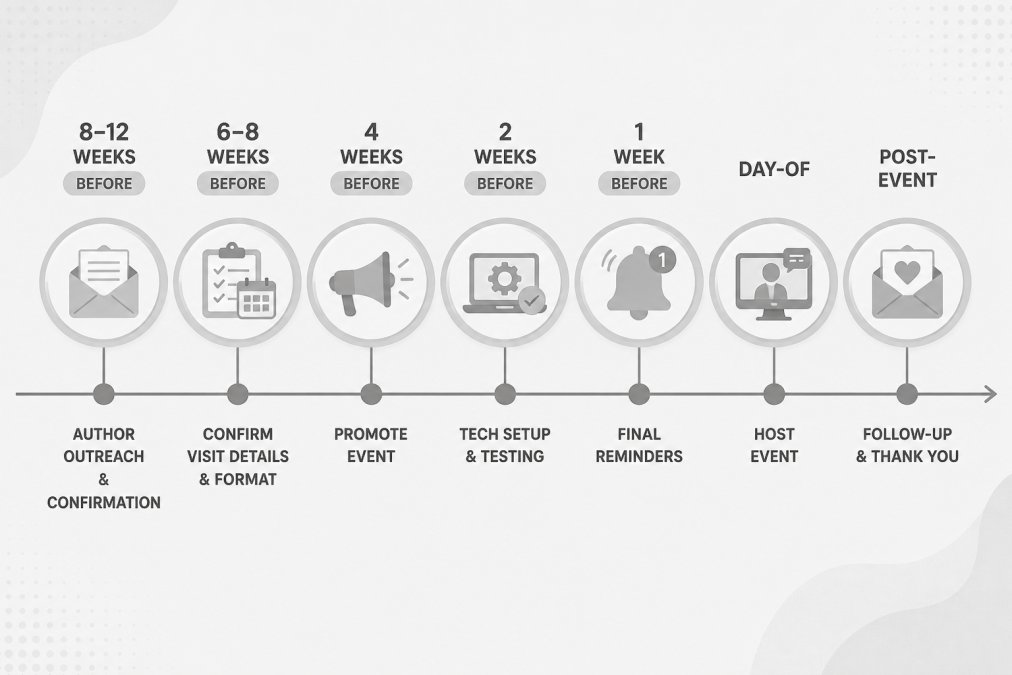
The scheduling workflow, step by step
8-12 weeks before: outreach and hold a date
- Email two or three authors at once so you're not waiting on a single reply.
- When an author shows interest, propose two or three specific date-and-time windows rather than an open-ended "when works for you?"
- Put a soft hold on your preferred date immediately.
6-8 weeks before: lock the date and send the calendar invite
- Confirm the date in writing, repeating the time in both zones: "3:00 PM Eastern / 12:00 PM Pacific."
- Send a calendar invitation to the author and any co-hosts with the video link, a dial-in number, and a one-line agenda.
- Ask the author to accept the invite, a verbal yes is not a calendar hold.
4 weeks before: promote and prepare
- Open registration and start promotion, four to six weeks of lead time is common for school and library events.
- Prepare discussion questions or a short activity so the author isn't carrying the session alone.
- Confirm accessibility needs with the author and your audience: captions, an interpreter, a quiet room.
2 weeks before: rehearse and confirm
- Run a 15-20 minute tech rehearsal on the actual platform. Test video, audio, screen sharing, and the waiting room.
- Confirm the author's backup plan: a phone number if their internet drops, and whether they can switch to audio-only.
- Re-send the calendar invite with any updates.
1 week before: final reminders
- Send participants a reminder with the link, the time in their local time zone, and simple joining instructions.
- Send the author a short brief: audience age, headcount, what they're most excited about, and how you'll handle questions.
- Prepare a short author bio and any slides or book-cover graphics.
Day of: buffer and host
- Open the room 15 minutes early and test everything once more.
- Build in a 5-minute buffer at the start for late joiners and at the end so the session doesn't run into the next class period.
- Greet the author first, then welcome participants as they arrive.
After the event: close the loop
- Send a thank-you note within two business days.
- Share highlights or a recording (with permission) with your community.
- Gather a short feedback form and pass the highlights to the author.
Time zones, class periods, and the school-day reality
Time zones are the most common scheduling mistake, and they're easy to prevent.
- Always write times in both zones, spelled out: "10:00 AM Central / 8:00 AM Pacific." Avoid bare abbreviations like "CST."
- Check whether either party observes daylight saving time on a different schedule, a date that works in March may shift an hour in April.
- For schools, schedule against the bell schedule, not the clock. A 45-minute period is really 40 minutes of instructional time, so book the period but plan for the shorter window.
- Avoid first period and the period right before lunch if you can.
A simple confirmation cadence
A short, predictable rhythm of confirmations keeps the visit on track without overwhelming the author:
- Confirmation email when the date is locked (with the calendar invite attached).
- A brief check-in two weeks out to confirm the rehearsal time.
- A one-week reminder with the audience brief.
- A day-before note with the link and a thank-you in advance.
Four touches over two months is enough, more feels like pressure.
Determine the Right Virtual Author Visit Length for Your Group
Most authors do well with 45-60 minutes total: 20-30 minutes of reading or presentation, then 20-30 minutes of questions and conversation. That length holds attention without wearing people out.
Adjust based on your audience:
- Elementary school (K-3): 30-40 minutes total, with more interactive activities
- Middle school (4-6): 40-50 minutes, mix of reading and Q&A
- High school and adults: 60-90 minutes, deeper discussion welcome
- Book clubs: 60-75 minutes works well for engaged adults
Longer isn't always better, a focused 45-minute session where people feel genuinely connected beats a dragging 90-minute event. Ask the author what they prefer; many have a natural rhythm from experience.
Virtual Author Visit Ideas for Book Clubs and Classrooms
The format you choose shapes the whole experience. Here are approaches that work:
Live reading and Q&A: The author reads a passage, then answers questions, simple, direct, and readers love hearing how the author interprets their own words.
Discussion-focused session: A structured conversation about themes, characters, or the writing process. Works beautifully for book clubs that want depth.
Interactive writing exercise: The author leads a short writing prompt, participants try it, then share.
Breakout room discussions: For larger groups, split into smaller rooms with the author rotating between them so everyone gets heard.
Mix formats if you want, say, 20 minutes of reading, 10 minutes of behind-the-scenes story, then 30 minutes of open Q&A.
Step 4: Handle Logistics, Technology, and Follow-Up
The technical side matters more than you might think, a smooth experience keeps focus on the author and the conversation. Here's the practical version, including backup plans, accessibility, and how to measure whether the visit worked.
Choose a platform you can both run
Zoom, Google Meet, Microsoft Teams, and similar tools all work, pick the one you and the author are comfortable with and can test in advance. Confirm these settings before the day:
- Waiting room or lobby: on, so you can admit participants in a controlled way.
- Mute on entry: on, to avoid background noise.
- Screen sharing: enabled for the host and, if the author will share slides, for the author.
- Recording: available, but only used with the author's written permission.
The technical contingency checklist
Run through this list at the rehearsal, not on the day:
- Author has tested their camera, microphone, and internet on the actual platform.
- A backup link or dial-in number is ready and shared with the author in advance.
- The author knows how to switch to audio-only if video fails.
- You have the author's phone number (or another offline contact) in case the platform drops entirely.
Accessibility and inclusion
Small accessibility steps make a big difference, and they're easier to plan than to improvise:
- Captions: turn on live captions if your platform supports them, and tell participants they're available.
- Interpreters: arrange sign language or spoken-language interpretation early and give the interpreter the author's bio and likely topics in advance.
- Language needs: share key vocabulary or a short summary of the book ahead of time for students still building reading confidence.
- Students who cannot attend live: offer a recording (with permission) or a follow-up written Q&A.
Measure what happened
You don't need a formal study to know whether the visit worked. A few simple signals tell you a lot:
- Attendance versus registration: how many people who signed up actually showed up.
- Question volume and quality: did students ask follow-up questions, or did the session stall?
- A two-question feedback form: "What was your favorite moment?" and "What would you change?"
- Reading engagement afterward: watch whether the author's books get checked out, requested, or discussed in the weeks that follow.
Follow up warmly, and extend the learning
The visit doesn't end when the call does. Within a few days, send the author a thank-you note with a highlight or two and any feedback from your group, and share photos or a short recap with your community. Then give readers a way to keep the momentum going: a display of the author's books, a short writing prompt inspired by the visit, or a discussion circle the following week.
Common Mistakes to Avoid When You Schedule Virtual Author Visits
Learning from others' stumbles saves you headaches.
Vague communication: Be specific about date, time, length, format, and audience.
Poor tech rehearsal: Skipping the test run is asking for trouble.
Promoting too late: Start promoting 4-6 weeks before the event.
Asking for too much: Keep the author's part focused.
Forgetting the human touch: A virtual event is still an event.
Scheduling a virtual author visit isn't complicated once you have a process.
Frequently Asked Questions
How far in advance should you schedule a virtual author visit?
Plan 8-12 weeks ahead when possible. This gives authors time to check their availability and lets you promote the event to your audience. For book clubs with flexible schedules, 6-8 weeks is workable. Last-minute requests (2-3 weeks) sometimes succeed with indie authors, but don't count on it. The earlier you reach out, the better your chances of securing your preferred author.
How long should a virtual author visit last?
Most virtual author visits run 45-60 minutes total. A typical format includes 20-30 minutes of author presentation or reading, 15-25 minutes for live questions from your audience, and 5-10 minutes for closing remarks. For younger students, 30-40 minutes works better. Adjust based on your group's attention span and the author's preference, ask during your initial contact.
What should you include in an author visit request?
Your request email should mention your group's size and age range, which books you're featuring, your preferred dates and time zone, and what format you're imagining (reading, Q&A, workshop). Keep it brief and personal, authors respond better to genuine enthusiasm than generic pitches. Include a link to your book club or school website if you have one, and explain why their books matter to your community.
What technology do you need for a virtual author visit?
You'll need a video conferencing platform (Zoom, Google Meet, or similar), a stable internet connection, a camera and microphone, and ideally a backup device. Test everything 24 hours before the event. Have the author's contact number handy in case of technical issues. Consider screen-sharing capability if the author wants to show slides or book artwork during the visit.